
Table of contents
Share
A picture is worth a thousand words. Well, if it can’t be misinterpreted, that is. Even in today’s world, with its enormous amounts of data and the technology to visualise it in real-time, effective and user-friendly data visualisation remains an art.
“Use a picture. It’s worth a thousand words.” That’s how Tess Flanders was quoted in The Post-Standard, in a debate about journalism and publicity organized by the Syracuse Advertising Men’s Club in 1911. More than 100 years later, the saying still flies. Well thought out and executed visualizations create insights.
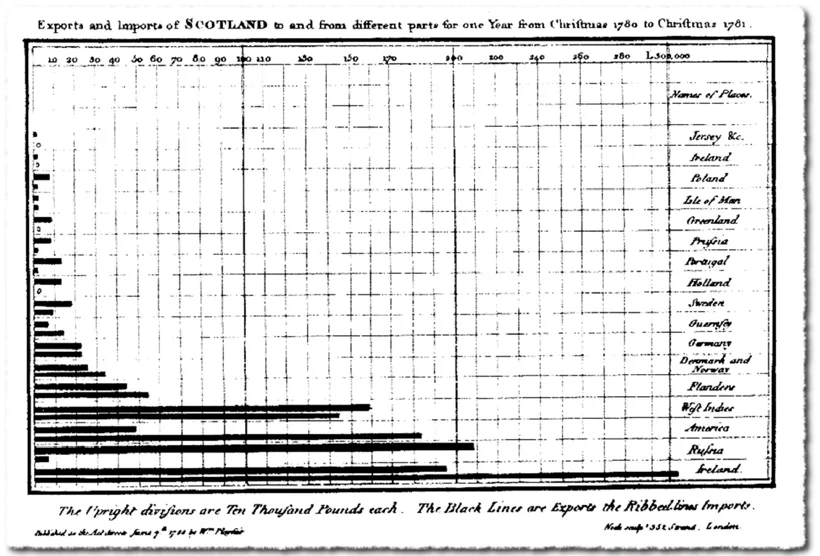
The very first bar chart (1786) – William Playfair
Since the late 18th century, different types of presentation were invented: from bar charts and pie charts, to radar, spiral, bubble, area and flow charts. In more recent years, the evolution of technology made it easy to visualise data: from PC to smartphone, from spreadsheet and PowerPoint to visualisation app.
In just a few decades, we evolved from a spoken and written culture to a primarily visual culture. We prefer watching a short clip on YouTube to reading a lengthy manual. But as technology makes things easier and cheaper to produce and more attractive to consume, the amount of possibilities and options make it harder to do things right.
In transactional environments such as payments or reservations, user experience is becoming an art, mastered only by true specialists. The same applies to data visualisation in informational environments. If you don’t want our picture – the one that is worth a thousand words – to be misinterpreted, you need a data visualisation specialist to step in.
Strong data visualisation in 4 steps
Step 1: Collect high-quality data
The quality of the collected data determines about everything that follows later on. So check the data sources, pursue data completeness and remove duplicate data.
Make sure the data is tailored to the end consumer’s needs:
An example of omitting irrelevant attributes:
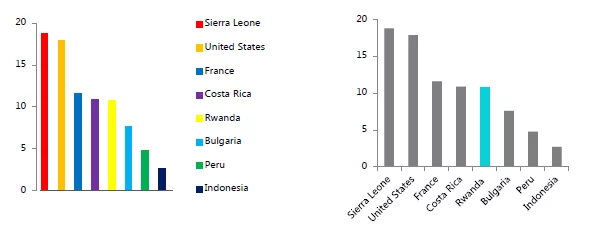
The multi-colored graph is harder to read because the color use is disruptive. The “Gestalt law” of similarity in the first row of all-gray graphs removes the extra cognitive overload, as does labeling the bars on the axis rather than with a color-coded key. Deliberate color use, however, can make specific data stand out with the law of focal point.
Step 2: Align data visualisation with the end user
Comparing visualisation with art makes sense looking at the needed creativity and skills. But artistic freedom is somewhat limited by the functional goals. And who else than the end user can judge the quality of the end product in view of his intentions?
To align data visualisation with the end user:

An example of various options to help select the right format. You see the original design and then three alternative visualisations.
Step 3: Get the intention of data visualisation right
The visualisation’s purpose can be anything, really. There’s just one prerequisite: make sure it’s crystal clear.
Data visualisation can be used for:

© Reuters
The importance of selecting the right data visualisation format is shown by the ‘Gun deaths in Florida’ graph above. The graph seems to indicate that the amount of gun deaths decreased since the ‘Stand Your Ground’ law came into place. While exactly the opposite was true. Simply orientation the graph in a wrong way, distorts your data.
Step 4: Select the right data visualisation method
To use the appropriate visual for the appropriate case, you need to consider various elements:

Choosing the right data visualisation method. © Andrew Abela’s Chart Chooser
In summary: the data visualisation journey
Data visualisation is a mature discipline, but it needs special care. Only when you make the right choices, you will be able to achieve the goal you are aiming for. To do so, you need to master your data, the data visualisation purpose and the right technology.
To get to the data visualisation you have in mind, you need to take things step by step:
- 1collect and cleanse the data
- 2
align visualisation with the end user
- 3
get the intention of the visualisation right
- 4
select the right visualisation method
Making the right choices is the key to success. Follow the four steps we discussed, and they will help you turn data into information and maximize insight. And as you probably already noticed: we didn’t talk much about technology in this blog post. Because, as always, technology is an enabler and not a goal in itself.
