| LACO
| LACO

5 key takeaways from SAS Innovate that could reshape your AI strategy

SAS Innovate is a showcase of how SAS tools can be used to build AI-driven applications that reshape how businesses harness data and AI.

It’s also a chance to gain insights and knowledge that simplify and enhance data and AI ecosystems, save businesses time and make it easier to make the right decisions.
From synthetic data to hands-on experimentation, here’s what stood out, and what it means for your organisation.

Takeaway 1:
Synthetic data in AI has potential, but its value remains to be proved

Synthetic, AI-generated data allows for analysis without using real information, keeping data blinded and secure. It’s used for a wide range of purposes, like:

  • fraud detection
  • cybersecurity monitoring
  • policy development
  • law enforcement
  • economic analysis
  • clinical trials
  • worker safety
  • quality control

It preserves the statistical properties and patterns of the original data and can increase the volume of minority data, enabling models to be better trained to recognise this group.

Augment & generate data

This is what the SAS Data Maker does. It unlocks the potential of existing data using a low-code/no-code interface to quickly augment or generate data.

While it can be very useful for specific sectors with strict data privacy requirements, its practical value will really depend on pricing and packaging, especially when compared to more DIY solutions using custom scripts and blinded datasets. Our verdict: watch this space.

Read more: How to create an impactful data governance policy

Takeaway 2:
We’re quickly moving towards smarter automation, safer workplaces & sensitive chatbots

Several practical AI innovations are happening within SAS. A highlight from the showcase was the introduction of an SAS custom step in Viya — an easy-to-use, modular feature accessible to both SAS and non-SAS users, with use cases like auto-documenting code and supported by a public GitHub repository.

Agentic AI addresses hallucinations in AI-generated responses by using tools like SAS Model Manager to track prompts and available language models.

Guardrails for chatbot interactions use sentiment analysis to handle sensitive scenarios like missed payments or emergencies, and can automatically derive actionable steps from conversations.

Lastly, event stream processing is used to detect and prevent workplace incidents by monitoring CCTV footage for safety compliance (e.g. missing PPE) and alerting relevant teams in real-time.

Takeaway 3:
SAS Viya Workbench is a big step forward

The SAS Viya Workbench is a coding interface for developers that appears to be a solid move by SAS with lots of potential. What are the benefits?

It allows users to work with SAS, Python or R in a notebook way of working.
It focuses on self-service, enabling developers to allocate the resources they need and choose their preferred IDE.
It’s a standalone tool that doesn’t require additional SAS Viya or SAS 9 licences.
Improvements coming in Q2 and Q3 include customisable environments and batch scheduling.

Stepping up

The Viya Workbench feels like a promising step forward. With Microsoft setting strong examples like Databricks, Fabric and Synapse, it’s encouraging to see SAS stepping up with similar products. If development continues, Viya Workbench has the potential to become a widely adopted multilanguage platform — something many enterprises will find appealing.

Want to know more? SAS has created a webinar with additional information here

Takeaway 4:
Clear communication remains essential

The evolution of the data and analytics ecosystem into an integrated cohesive (cloud) platform offers exciting prospects for organisations seeking to unlock the full potential of their data assets. These figures show that if organisations can learn to navigate the evolving landscape, they can harness the transformative power of integrated cloud data platforms.

  • By 2024, enterprises that primarily build applications leveraging a D&A ecosystem from a single cloud service provider will outperform competitors, despite vendor lock-in.
  • By 2024, 50% of new system deployments in the cloud will be based on a cohesive cloud data ecosystem rather than on manually integrated point solutions.
  • Through 2025, powerhouse cloud ecosystems will consolidate the vendor landscape by 30% leaving customers with fewer choices and less control of their software destiny.

Takeaway 5:
SAS 9.4 M9 released, a major leap in security and integration

The latest maintenance release of SAS 9.4, M9, was launched on 17 June 2025. It delivers a robust security enhancements, Azure integration improvements and a clear roadmap for the future beyond M9.

  • Security first: M9 introduces automated TLS setup, drastically reducing manual configuration and errors. A centralised certificate management improves governance and consistency. The release also brings Multi-Factor Authentication (MFA) with Single Sign-On (SSO) integration, and commits to quarterly security updates
  • Azure & Viya integration: M9 strengthens interoperability with SAS Viya and Microsoft Azure, making hybrid deployments smoother and more scalable.
  • Extended support: SAS has confirmed standard support for 9.4 M9 through 2030, giving organisations long-term stability.
  • Future-proofing: Even more importantly, SAS has confirmed that another maintenance release (M10) is on the roadmap, reassuring us for continued investment in the 9.4 platform.

Why these insights matter

SAS Innovate made one thing clear: the data and AI landscape is evolving fast, and organisations need to keep pace. From synthetic data and agentic AI to hands-on tools like Viya Workbench, the innovations on display aren’t future concepts, they’re practical enablers that can drive smarter, safer, and more efficient decisions today.

For businesses aiming to future-proof their data strategy, SAS is positioning itself as a powerful ecosystem to build on. And for data & AI teams like ours at LACO, the event reaffirmed the importance of staying curious, experimenting with new tools, and continuously refining your approach in an ever-changing environment.

5 key takeaways from SAS Innovate that could reshape your AI strategy2026-02-16T08:37:54+00:00

Moving your SAS platform to the cloud: business lessons learned

Once you’ve moved your data platform to the cloud, your work as an IT professional tends to get a lot easier. But to be honest, getting that platform there in the first place can be quite a daunting task. How to tackle that?

Now, when it comes to SAS migration in general, LACO has always been somewhat of a pioneer on the Belgian market. As a matter of fact, LACO was the very first SAS partner to successfully deliver a SAS cloudification project in Belgium. Here are three important lessons we’ve learned from our experience with SAS cloudification so far. You might use them to your advantage!

Lesson 1: Take on the legal and regulatory hurdles from the start

The days that IT professionals sincerely worried about cloud security are long past. Most of us came to trust the high level of security that is built into the major cloud platforms, protecting data by design and by default when used correctly. Unfortunately, however, that hasn’t stopped some of our business colleagues from still worrying about these issues. Their fears need to be acknowledged too, of course. But then it is up to us to address those concerns with clear and hard facts we have at our disposal today. Even more so, as those persistent fears could turn out to be a real showstopper. If your CFO is not comfortable with moving his data to the cloud, for instance, then your project risks never taking off in the first place.

And talking about showstoppers: in certain sectors, such as the insurance industry, there is a set of mandatory legal rules and government restrictions that you absolutely have to take into account, before you can even think of moving your data platform to the cloud. These compliance demands are not insurmountable, but they will require you to obtain several official approvals, sometimes even undergoing a risk assessment. And that usually takes time, as there are no shortcuts or detours for it. Which is why, in these specific sectors, we always start a cloudification project by tackling the legal and regulatory hurdles. If these cannot be overcome, the project simply cannot move ahead.

Lesson 2: Be clear on the business case

A popular misconception that we often come across, even though people should really know better by now, is the idea that running your IT infrastructure in the cloud is by definition cheaper than running it in your own data centre – or having a hosting partner run it for you. In our experience, however, simply migrating your servers to the cloud rarely brings any real value to your business, not even from a purely financial perspective. On the contrary: it often turns out to be more expensive.

No misunderstanding, however, this only applies if you use the cloud the way you would use your former on-premise data centre by leaving all your servers running 24/7 all year round. The great thing about the cloud is that it allows you to run only those servers you require, switching systems on and off at any given notice. It basically lets you add or remove hardware resources in function of your actual computing needs. So if, say you have a reporting environment that is only used intensively by your business colleagues during working hours, you can decrease the server capacity for that environment before and after those hours. Another typical example for cost savings is a testing environment. Instead of keeping it running all the time, even during weekends, you could limit yourself to using that part of your infrastructure only when you actually need to do some testing.

So by using that flexibility, which is typical for the cloud, you can effectively optimise and strengthen your financial business case. Nevertheless, if you ask us, the real key to cloud success is in going beyond the financials approaching SAS cloudification not as a migration project but as an optimisation project. Instead of regarding the cloud merely as an alternative for your own data centre or that of your hosting provider and in a way continuing what you’ve always been doing, you should treat it as a springboard to a new world with possibilities you could only dream of before.

If you look at the cloud for new capabilities and extra functionality, you might just discover that there are applications and functionality within your reach, such as advanced disaster recovery features, that you would never have been able to deploy with just your own data centre.

Lesson 3: Match your licensing models

Moving your SAS data platform to the cloud also requires matching the different licensing models. This is especially challenging when you’re dealing with an older licensing model for your data platforms, since these older models – and not just those used by SAS – are still very much bound to physical hardware such as CPU cores. That is not necessarily the case, of course, with virtualised and cloud environments, where usage- and client-based licensing models continue to grow in popularity.

Matching licensing models is somewhat less challenging, as you can probably imagine, for those customers who have already moved on to SAS’ latest data platform: SAS Viya. Running on a scalable, cloud-native architecture, SAS Viya is an open and cloud-ready platform. Consequently, SAS Viya customers can entirely benefit from an easier cloud migration concerning licence fees.

The exercise of matching your software vendor’s licensing agreement with your needs in terms of scalability and elasticity, has to be done right from the start, as it might be another showstopper. Therefore, we invariably advise our customers to reach out and establish a satisfying agreement with their vendor and in some cases even their cloud provider. Not only they usually have a number of licensing programmes to choose from, sometimes with discounts that customers can profit from. They can also help to establish a smooth transition period. After all, you don’t move to the cloud overnight, do you?

So far for the business lessons learned from our SAS cloudification projects. Feel like diving a little deeper into the actual technology? Head quickly to our blog post with technical lessons learned . But first: check out our SAS cloudification page!

Moving your SAS platform to the cloud: business lessons learned2026-02-16T08:39:24+00:00

SAS Viya 4 ups its game with cloud-native approach

“The cloud movement” is here to stay. So yes, it makes perfect sense for SAS to launch the new version of its Viya data intelligence platform as a cloud-native one. No big deal, you think? Well, think again. Viya 4 – also know as Viya 2020.1 – offers a full cloud-native and optimised approach in terms of integration, delivery and pricing. A radically different approach compared to what we were used from SAS.

For SAS, Viya 4 is the company’s first fully cloud-native platform. This is nothing less than a revolution in the approach of the product. Becoming cloud-native meant a number of drastic changes in four domains: scalability, portability, velocity and CI/CD (Continuous Integration/Continuous Delivery).

The 4 biggest changes in SAS Viya 4

Scalability

When using the cloud-native version of SAS Viya 4 scaling is easier than ever. Whether it is scaling up for speed, capacity or security there is no need to change anything in the architecture of your current installation of SAS Viya 4, as you can expand capacity faster using the power and facility of your cloud platform. A simple request for up- or downscaling is enough to match the need of the current system.

Portability

SAS offers cross-platform server technology. Viya 4 has the same objective as cross-cloud platform technology. SAS Viya 4 relies on Kubernetes, which enhances the portability of the general product from one cloud to another. Kubernetes adds an abstraction layer – a Kubernetes container – on top of the proprietary (Amazon, Google, Azure, … ) cloud structure. As a result, SAS runs in the container unaware of the actual cloud platform the container runs on.

Velocity

Compared to the older versions, solution configuration and deployment on Viya 4 can be done really quickly and easily. Viya 4 integrates fully cloud-optimised configuration and deployment capabilities. Deploying a new instance or a new bundle can be done in just a couple of clicks, straight from the SAS console. Moreover, SAS also provides a complete out-of-the-box solution on Azure that can be tuned for specific requirements.

CI/CD

Viya 4 is the first ever version of a SAS product that is delivered using the CI/CD process. As a result, it will provide frequent and automatic updates, upgrades and bug fixes. The new versions will follow a naming convention based on the year, month and type of release.

Viya 4.0: advantages for all

For the IT team: cloud infrastructure integration

| LACO

© SAS

For the developer and system administrator, a major benefit of SAS Viya 4 is it can be deployed on any cloud platform, thanks to the use of Kubernetes. As a direct result of the new partnership between SAS and Microsoft, Viya 4 is also available as an out-of-the-box cloud solution hosted on Microsoft Azure. The partnership between SAS and Microsoft will offer the IT team more possibilities to find synergies between both providers.

And there’s more. As a cloud-native solution, SAS Viya 4 enables the use of cloud features, instead of being limited to its own features. For example, when you already run an authentication system on a cloud service, there is no more need to use the SAS Logon for SAS Viya 4. The use of cloud features will simplify the role of the system administrator.

For the business user: a new look on Business Intelligence (BI)

Viya 4 reflects SAS’ strategic vision on BI. Lots of tools are available at the moment, and a structured development plan is in place to regularly add new and more powerful tools.

For the CMO, for example, it will be easier to integrate all relevant customer data, resulting in a more complete customer view, especially as SAS offers close integration with other cloud data such as Google Analytics and plans on strengthening its integration with Microsoft CRM Dynamics.

For the expert and advanced user: a modern application approach

With SAS Viya 4, it becomes really easy to use SAS insights in other applications. More than its previous versions, Viya 4 is open to the outside world. Among other things, Viya 4 allows the easy integration of calculated measures and other numbers in other applications. The API has been announced but is still in development. It will allow developers on other platforms to use the new API to integrate numbers and statistics calculated in SAS within their own applications.

For the CFO: quicker data integration and new pricing

For the CFO, SAS Viya 4 offers a quick return on investment. Thanks to integration with other systems, advanced analytics and shorter process times, it makes financial reporting easier and acquiring data faster. CFOs use the data cloud platform to make correct informed decisions. Of course these can only be made on recent, well structured data. SAS Viya 4 brings all of this with its clear reports and strong analytics and forecasting tools.

Also, with the new version of Viya 4 comes a new pricing philosophy. SAS decided to group different modules into bundles. Pricing is now based on the number and type of users for a specific bundle, resulting in a transparent and predictable pricing model.

| LACO

The different pricing models of SAS Viya 4. © SAS.

| LACO

The different SAS Viya 4 offerings, enabling the complete analytics journey. © SAS.

And more to come…

SAS Viya 4 marks a clear change of approach and philosophy throughout the entire SAS vision. The greater ease of integration, the new delivery system and the new pricing method take the spotlight of this new release.

At the same time, there’s still a lot more to come. Although SAS is positioning Viya 4 as a true cloud-native solution, not all the work has been done already. Viya 4 comes with a lot of new tools, but not all of them already have all the capabilities the older, non cloud-native versions had. It means that, although Viya 4 offers a strong analytical platform, you may still need some of the standard SAS software for specific functionalities – and the traditional platform management duties that come with that.

SAS plans to include more of its solutions on the Viya platform. We, at LACO, are very excited about the new possibilities that will arise. But we also realise that SAS still has a lot of ground to cover – which will need some time to complete.

SAS Viya 4 ups its game with cloud-native approach2026-02-16T08:41:16+00:00

How to create geographical reports in SAS VA using custom polygons: a three-step approach

Many businesses operate within a certain geography or have a specific geographic relevance. For these businesses, visualising their business data on enhanced maps is of material importance in gaining valuable insights. And SAS Visual Analytics (VA) lets them do just that, even though it does not always offer the necessary geographic variables as a standard feature. That’s where custom polygons come in, allowing businesses to customise every map to their specific business needs.

In general, visualisation already works better than showing tabular data. And visualising your business data on top of a geographical map is yet another important step in rendering that data into valuable information from which to gain actionable business insights.

As we explained in another post, though, in order to obtain those precious insights, it is sometimes necessary to customise a map. And one way of doing that is by creating your very own custom polygons.

SAS offers specific functions to help you create those custom polygons, based on groups of existing polygons such as provinces, municipalities and other geographic variables that are readily available as standard features in Visual Analytics.

Let’s take a closer, more detailed look now at how you can use custom polygons to easily produce your own tailor-made reports in SAS VA.

Step 1: Creating polygon definitions

First, of course, the custom polygons need to be created. There are always shape files you can find, retrieve or buy which contain standard polygon information about a nation’s geography, such as regions, provinces, municipalities and communes. Based on those polygons, you can now start to create your own custom polygons by grouping some of the aforementioned shape files together. In our example, we will use Belgium, our home country, as a nation. Some names of regions will be typically Belgian. A similar logic can be applied to other countries’ regions, though.

SAS has some specific geographical procedures that can be used for this. To start, we need to import the available shape files of the municipalities by using the PROC MAPIMPORT procedure. As a second step, we need to join these imported municipalities with the sectors we have defined ourselves based on grouping some municipalities together in one sector.

| LACO

As a result, we now have the polygon information of each municipality in a sector linked to that sector itself. But to be able to use this properly, we need to redefine the outline of the polygon that groups all those municipalities together. This is achieved by using the PROC GREMOVE procedure of SAS.

| LACO

The only thing remaining for us is now to join the information to the correct location. There are mainly two tables that need to be adapted to be able to use the polygon definitions in our VA reports. Both tables can be found in the VALIB folder in the SAS config folder:

  • ATTRLOOKUP: contains the information about the custom created polygons themselves, both for the groups of all polygons and for each created polygon separately. Here you define an ID, a label, a unique prefix (2 letters), a name, an ISO code and an ISO name.
  • CENTLOOKUP: this table contains the coordinates that need to be connected for each polygon. So, here you define the map name, the ID and the X and Y coordinates for each polygon out of the dataset you created using the PROC GREMOVE procedure.

Step 2: Uploading polygon info to SAS VA

To be able to use our custom polygons in SAS Visual Analytics reports, we need to make sure now that the two previously created tables (ATTRLOOKUP and CENTLOOKUP) are stored on the SAS VA server in the correct location. Then that server needs to be restarted to make sure that the polygons and their definitions are loaded properly into memory, so they are ready for use in the SAS VA reports.

When you have defined formats on the polygon IDs to show names instead of meaningless IDs, you also need to make sure that those formats are set in the table and that the formats catalog is also loaded to the VA platform. User-defined formats are not automatically loaded to SAS Visual Analytics. You need to put the catalog with the formats in the defined location on the SAS configuration of your VA platform. More details can be found here.

Step 3: Creating your own reports in SAS Visual Analytics with custom polygons

To use the custom polygons for your reports, you start by creating a new report and selecting a dataset that contains figures together with the IDs for the sectors you’ve defined.

When viewing the available columns of the selected dataset, you need to right-click on the sector ID and select geographical -> Custom polygon. Then you can select your created custom sector name from the list. When you now add a “Geo Region Map” to the report and drag your ID on it, together with a metric, it will show the polygons.

You can tweak your report by changing the colouring, transparency, contrast, etc. of the polygons based on the selected metric or standard.

| LACO

This is an example of custom regions created from lower-level existing regions.

Conclusion

As you can see, it is not all that difficult to create your own professional SAS Visual Analytics report, using custom polygons with defined regions or sections. All in all, there are just three small steps to take:

  • 1
    Create the custom polygons with SAS code
  • 2
    Upload the custom polygons information to the VA platform
  • 3
    Use the custom polygons to create your own tailor-made geographical reports

Simply follow these steps and in no time you’ll be creating reports that are better adapted to the specific needs of your company and/or your clients.

How to create geographical reports in SAS VA using custom polygons: a three-step approach2026-02-16T08:41:29+00:00

Customising your geographical reports in SAS VA for superior insights

In visual analytics, too, one size does not fit all. That is why SAS allows you to customise, among others, your geographical reports. And one way of doing that is by creating your very own custom polygons. A custom polygon, in simple layman’s terms, is a type of geographic variable supported by SAS Visual Analytics (SAS VA), along with custom coordinates and a number of predefined geographic variables.

Using predefined geographic variables, as listed here, you can easily visualise your business data to create, for instance, an insightful map of the countries, regions, provinces, etc. you are operating in. But what if your business is not organised according to these predefined variables? What if (part of) your sales organisation is specifically geared towards, say, South-West Flanders, the Kempen or the Rhine area? Then those custom polygons sure come in handy!

SAS Visual Analytics: objects and maps

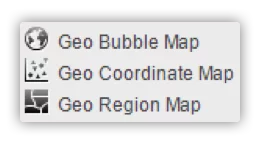
When creating maps in SAS VA, there are multiple object types to choose from:

  • Geo bubbles allow you to place a bubble with a size and a color value in specific places on the map.
  • Geo coordinates allow you to place dots on the map indicating the places of interest.
  • Geo regions is the one we will use for our polygon images.
| LACO

Each of these object types requires a geographic variable, which is a variable with extra information attached to it. Sometimes longitude and latitude values serve as such, in other cases a polygon does. (You can find out more about geographic variables in this SAS blog about geo maps)

Custom polygons: what’s in a name?

When we talk about custom polygons, we are referring to regions, sectors or other geographic variables that are not available as a standard feature or function in SAS Visual Analytics. Lots of businesses and industries in fact have their own specific map divisions, such as the regions in which their stores or agents operate, to give but one example. The polygons for these are not available for download. They are, however, very easy to build yourself. You really don’t have to be a techie at all to do so successfully.

How to create your custom polygons

First things first: to create your own custom polygons, you need a good point to start off from. Fortunately, there are always shape files you can find, retrieve or buy which contain standard polygon information about a nation’s geography, such as regions, provinces, municipalities and communes. Based on those polygons, you can now start to create your own custom polygons by grouping some of the aforementioned shape files together.

SAS has provided several functions you can use for this:

  • MAPIMPORT imports the available shape files.
  • GREDUCE redefines the outline of the polygon.

When finished, the new polygons need to be loaded into the system.

Custom polygons in SAS VA: use case

Suppose you have organised your activities based on a number of regions in Belgium that are specific to your business. The map on the left below presents you with a standard overview of your business activities in all Belgian municipalities. It probably won’t take you long to realise that it will be fairly hard, if not downright impossible, to gain actionable insights from the way those activities are represented here.

Now take a look at the map on the right. It contains the same information about your business activities from the same Belgian municipalities. Only now they are grouped by region: those regions, to be precise, that are specific to your business. A colour range, indicating high and low values, now clearly shows you – in the blink of an eye, so to speak – how your different regions are performing. Since the polygons used to achieve this are nowhere available, they had to be custom-made.

| LACO

As this example of custom regions created from lower-level existing regions also shows, polygons can be used in hierarchies, allowing you to go from a lower level (e.g. Municipality) to a higher level (e.g. Region) – and vice versa. Very often custom polygons fit in some middle layer, where they will open up to the lower structures from which they were created.

In this particular use case we stayed within one country. Another benefit of deploying custom polygons is that it is easily possible to create regions while not looking at country borders.

In conclusion

Did we spark your interest in custom polygons? Great! In deploying them whenever required, your reports are guaranteed to be more adapted to the specific (business) needs of your company or client.

To summarize:
  • 1
    Custom polygons are structures that are not readily available for download, neither bought nor free.
  • 2
    The creation of custom polygons requires some technical steps.
  • 3
    SAS provides functionalities to help with the creation of custom polygons.
  • 4

    Visualisations can now fully adapt to business needs.


Customising your geographical reports in SAS VA for superior insights2026-02-16T08:41:42+00:00

Seamless software migration in a complex hospital environment

A major software migration is always a delicate undertaking — even more so in a large hospital setting. The transition to a new version of SAS BI software at Cliniques Universitaires Saint-Luc demonstrates the importance of having the right partner for the job. “LACO ensured a streamlined migration and delivered it on time and well within budget,” says Mevenig Mouazan, BI Analyst at Saint-Luc.

Setting the scene:

managing massive data volumes

Saint-Luc University Hospital in Brussels is one of the largest hospitals in Belgium, with 6,000 staff members and around 1 million care activities – including 460.000 consultations, 35.000 hospitalizations, 20.000 surgical interventions – per year. The hospital’s BI team uses SAS 9 for data analysis and reporting based on non-medical data from finance, HR, and other support services.

The scale of the platform is significant. “The billing data alone speaks for itself,” explains Mevenig. “We process 250 million billing lines annually, which we keep available on the platform for a full decade. In total, this amounts to 2.5 billion billing lines — and that’s just the accounting data.”

The problem: a seven-version jump

Until recently, Saint-Luc used SAS 9.4 M1, hosted on a Windows server in the hospital’s data center, to manage and analyze this data. This version reached end-of-support last year. But during the period Saint-Luc had been running version M1 — around 10 years — SAS 9 had already evolved to M8. Given the numerous versions between M1 and M8, a simple update wasn’t an option, so the hospital enlisted the help of SAS partner LACO to bring it up to date.

The solution: detailed roadmap, meticulous execution

The first step was to install new server infrastructure. “In most cases, an update spans two to three versions, say, from version two to version five,” explains Gregory Ong, SAS Practice Lead at LACO. “You start with the current platform and perform the necessary updates, while running both versions in parallel. At Saint-Luc, we had to bridge seven versions. This turned the project from an upgrade into a full migration.”

This also provided an opportunity to weigh up the pros and cons of on-premises versus the cloud, and Saint-Luc ultimately opted for the on-premises version of SAS 9. “Our IT department prefers to perform critical operations on our own servers,” says Mevenig. “For this project, we saw no significant added value in running the software in the cloud. So we installed a new on-premises Windows server as the foundation.”

In a hospital environment, timing is everything. “SAS encompasses data crucial to the hospital’s operations, including finance and HR,” Mevenig explains. “We had to synchronize this data with the new SAS version, which was located on a different server. But it goes without saying that we couldn’t simply stop our activities at any point.”

Here, LACO’s experience made all the difference. “LACO developed a very detailed roadmap in close consultation with us,” says Mevenig. “Their experts mapped out all the necessary steps and guided us on how to best approach them. Security and data confidentiality were a key focus, and the expertise and experience of the LACO team really gave us peace of mind.”

The result: a future-proof BI platform (and also a model project)

The initial driver for the migration was the loss of support for SAS 9 M1. “I honestly don’t think we would have made the leap otherwise,” admits Mevenig. “The old software still served us perfectly well. But now that the migration is complete, we’re definitely seeing other benefits. The old version was reaching its capacity limits — that problem is now solved. And our users haven’t reported any hiccups since the migration, which also indicates that everything went smoothly. As an administrator, obviously you’re delighted when the software runs as expected.”

Gregory explains that LACO and Saint-Luc were quick to understand each other’s needs. “Having the right people on board, from both the integrator and the client, is crucial to the project’s success,” he says. “A migration risks delay and budget overruns if the client’s IT department doesn’t make the project a priority. But that wasn’t the case here at all. All our meetings were efficient and to the point. Business, IT and LACO were fully aligned, with excellent communication and collaboration. As a result, we completed the project on time and well within budget. You could call it a model project!”

“We’re delighted with the collaboration with LACO,” concludes Mevenig. “Even after delivery, we continued to receive all the support we needed. We’re set for many years to come with our SAS solution and we consider LACO the perfect partner for future integration projects.”

Planning a major SAS upgrade?

Seamless software migration in a complex hospital environment2026-02-03T11:17:56+00:00

Compliance and operational reporting: from fragmented data to trusted insight

Compliance and operational reporting are becoming more demanding as regulators, auditors and boards expect timely, consistent and explainable numbers, supported by strong risk data aggregation and governance. Organisations must show not only what they report, but also how figures are derived, aggregated and controlled across systems – reflecting principles found in BCBS 239 and broader RDARR guidelines.

At the same time, many reporting landscapes are still built on a mix of legacy platforms, local extracts and spreadsheets, making it difficult to guarantee data quality, lineage and governance end to end when supervisors or internal audit start asking detailed questions.

The data challenge

Behind every compliance report sits a data problem:

  • Critical metrics (financial, risk, ESG, operational KPIs, customer or product metrics) are sourced from different systems, with overlapping or conflicting definitions, leading to inconsistencies between regulatory, risk and management reports.

  • Data moves through multiple steps – ingestion, transformation, aggregation – without consistent documentation or automated controls, so it is hard to trace how a figure in a report links back to the original transaction, which BCBS 239‑style principles explicitly expect.

  • Reporting teams depend on manual reconciliations and ad hoc SQL or Excel logic that only a handful of people fully understand, increasing key person risk and making it harder to evidence robust risk data aggregation.

As reporting requirements grow in volume and granularity under RDARR‑inspired expectations, these data issues become more visible. Organisations need reporting that is faster and more flexible, but also demonstrably governed: complete, accurate, consistent and explainable to internal and external stakeholders.

The solution: a governed data and reporting layer

LACO helps organisations redesign their operational and compliance reporting around a governed data foundation, using modern cloud technologies such as Microsoft Azure, Microsoft Fabric, Power BI and Azure Databricks.

The goal is to create a single, reliable layer where critical data is integrated, modelled and controlled, and from which both day‑to‑day operational reports and BCBS 239 / RDARR‑aligned compliance reports can be served.

Concretely, this means:

  • Data integration: ingesting source data from core systems into a central, secure data platform (for example using Azure Data Lake, Azure Data Factory or Synapse pipelines), with clear ownership and access controls that support regulatory expectations on data governance.

  • Semantic and modelling layer: building governed data models that standardise key definitions – such as exposures, limits, revenue, cost, ESG indicators or operational risk metrics – so the same trusted data feeds BCBS 239 reports, RDARR‑driven risk dashboards and management reporting.

  • Reporting and visualisation with Power BI: exposing governed datasets to business and compliance users via Power BI, with role‑based access, row‑level security and reusable report templates for recurring regulatory and internal reporting cycles.

  • Built‑in data quality, reconciliation and lineage: embedding checks, reconciliations and metadata so teams can trace any reported figure back to its sources and transformation logic, and can demonstrate that data is complete, accurate and consistent – core BCBS 239‑style requirements.

By placing this governed layer at the centre, work shifts from rebuilding logic in each reporting tool to modelling and governing data once and reusing it many times – for regulatory risk reporting, RDARR‑aligned aggregation, internal risk dashboards and operational steering.

Result: explainable, BCBS 239 / RDARR‑ready reporting

Compliance and operational reporting become more repeatable, explainable and resilient, and better aligned with BCBS 239‑ and RDARR‑style expectations.

Reporting teams work with a single set of validated data and definitions, reducing inconsistencies between reports and limiting discussions about which number is the “right” one, both internally and with supervisors.

Business, risk and compliance users gain access to controlled data through modern tools, without bypassing the underlying governance, quality checks or lineage.

Organisations can adapt more easily to new reporting requirements or additional disclosures, because the underlying data architecture and technology stack are already designed for scalability, governance and reuse – creating a reporting landscape that not only supports today’s BCBS 239 / RDARR‑inspired demands, but is also ready for further digitalisation, stricter data rules and new forms of analytics and AI.

The reporting transformation becomes an engine for agility and trust, ready to support future regulatory change.

Ready to strengthen your compliance reporting?

LACO helps you move from fragmented data and manual reconciliations to a governed, Azure‑based reporting platform with clear lineage, consistent definitions and BCBS 239 / RDARR‑ready insight for your stakeholders.

Compliance and operational reporting: from fragmented data to trusted insight2026-01-16T09:24:54+00:00

Hybrid data architecture | Connect SAS, Microsoft and Databricks with LACO

Large organisations rarely rely on a single data platform. SAS, Microsoft and Databricks each bring unique strengths, but when they operate separately they create silos, duplicated work and inconsistent reporting. A hybrid data architecture brings these platforms together in one governed and connected ecosystem.

LACO helps organisations design such architectures with a pragmatic and structured approach that aligns people, processes and platforms around one shared data strategy but without paying the integration tax of getting it all together.

The challenge

SAS, Microsoft and Databricks each offer value, but without a clear architecture they operate in isolation. Teams move data manually, ETL processes are repeated on different platforms and reports no longer match. Authentication rules differ, lineage is inconsistent and on premise tools are difficult to integrate with cloud environments. This creates delays, frustration and rising cost without delivering real progress. Organisations do not want to replace tools that work. They want an architecture that connects them.

The solution

The first step is understanding the full landscape. LACO performs a complete assessment of tools, processes and dependencies to reveal how data moves today. We then design a modular landscape and challanges that assigns clear roles to each platform. Integration is achieved through secure APIs, automated pipelines and consistent naming and governance standards.

We establish a shared governance layer that covers access rights, metadata, lineage and documentation so all platforms behave as one ecosystem. Change management ensures that IT, business users and data owners understand and trust the new setup.

Results

The organisation gains a connected, governed and scalable platform where everything works together rather than in parallel. The architecture eliminates duplicated work and ensures that data is traceable and compliant across all environments. Teams collaborate more effectively and speak the same data language.

Performance improves through automation, cost overlap decreases and the ecosystem becomes ready for AI and modern analytics. Instead of replacing existing investments, the organisation extends their value with clarity and control.

Ready for the next step?

Hybrid data architecture | Connect SAS, Microsoft and Databricks with LACO2026-01-15T10:12:52+00:00

Integrating SAS with Microsoft Azure

Many organisations rely on SAS as a trusted engine for analytics, reporting and modelling. At the same time, business users increasingly expect the modern flexibility of Microsoft Fabric and Azure Databricks. They want interactive dashboards, faster access to insights and a unified view across teams. This creates a gap between what the organisation already depends on and what the business now requires.

By integrating SAS with Microsoft’s cloud ecosystem, organisations gain the best of both worlds: a governed analytics engine on one side and a streamlined approach that minimises migration investment and accelerates change adoption on the other.

The challenge

SAS remains a powerful platform for processing and modelling, yet it was not built for today’s expectations around real time insights, cloud scalability and self service analytics. As a result, organisations end up switching between a central data warehouse (SAS DI) and end-user compute (SAS EG), manually exporting data and recreating reports. This leads to inconsistent versions, slow refresh cycles and a clear divide between technical teams and business users.

The challenge is not choosing one platform over the other. It is creating a landscape where they reinforce each other.

The solution

LACO helps organisations build a seamless bridge between SAS, Databricks and Microsoft Fabric.

  • The journey begins with a thorough scan of the existing SAS environment to understand dependencies, data sources and reporting processes.
  • Once there is clarity, we design an hybrid architecture where SAS outputs land securely and automatically in Databricks and Microsoft Fabric as certified datasets. These datasets follow shared governance and metadata principles so that access rules, terminology and lineage remain consistent across platforms.
  • We then automate the data flows to ensure that business users always work with up to date information. Manual exports disappear and data refreshes run on predictable schedules. Throughout this process, analysts and business users receive practical training so they can explore SAS outputs in Power BI with confidence.

The (gradual) transition becomes smooth, governed and supported by clear communication.

Results

The organisation gains one connected data landscape instead of two separate tools.

SAS continues to provide the analytical strength and validated outputs that teams rely on, while Power BI and Synapse deliver the flexibility and speed business users expect. Duplicate work disappears because data is prepared once and reused across the entire ecosystem. Reports refresh faster, users adopt the new environment more easily and IT teams spend far less time supporting manual tasks.

Most importantly, insights become both governed and accessible. Business users explore information in real time without recreating models or manipulating data manually, and leadership gains a trusted, consistent and audit ready view of the organisation. By connecting SAS with Microsoft’s cloud platform organisations modernise without replacing what still works and create a future ready foundation for analytics, AI and decision making.

Want to connect SAS and Microsoft Azure in a single data landscape?

We help you build the bridge — safely, efficiently and at your own pace.


Keep the strength of SAS. Add the flexibility of Microsoft Azure. And bring everyone onto the same page.

Integrating SAS with Microsoft Azure2026-01-08T09:54:32+00:00

Athora Belgium moves SAS platform to cloud in record time

A compelling and urgent move entails all kinds of limitations, but also offers unexpected opportunities. The Belgian branch of insurance and reinsurance group Athora discovered this when it had to migrate an essential part of its local application landscape on a very short notice. With the help of LACO, premier SAS partner and data specialist, they moved their SAS environment to the cloud.

Setting the scene:

What’s up?

In January 2019, Athora Group acquired Generali Belgium, which had been active on the Belgian insurance market for nearly 120 years. Today, this insurance provider offers a broad range of life insurance solutions to some 200,000 individual and corporate customers through its network of more than 500 independent brokers and financial advisors. Athora Belgium currently has 220 employees.

“With an acquisition comes integration, transformation and inevitably IT too”, says Nicolas Campodonico, COO of Athora Belgium. And those are precisely the three responsibilities that he was entrusted with after the acquisition: first as Head of Integration and Transformation, then as CITO. “My main assignment was to design the systems to fit into the Athora environment”

The problem: Moving offices

The integration and transformation process that followed the acquisition by Athora included a physical move to a new office at a new location in Brussels. However, it was not intended nor possible to move the existing ICT infrastructure along. “Most of our infrastructure was located in a remote data center. There was no immediate problem there. However, a smaller but nonetheless important part of the same infrastructure was still located in our old office building. So we had to find a solution for that suboptimal situation. And quickly as well, because the move was already planned six months later.”

That ‘smaller part’ of the infrastructure included a limited number of servers running a few critical applications supporting, among other things, risk management and simulations. Those core applications, including a cash flow prediction engine, were developed in-house a long time ago using SAS technology. Over the years they had also grown organically, resulting in a complex and untransparent environment which was difficult to re-engineer – at least not at a reasonable cost. Moreover, both the scalability and the performance of the applications left a lot to be desired. Generali had already managed to cope with that last shortcoming in the past. At the request of LACO’s SAS experts, their application and infrastructure landscape for risk management had already been optimized before.

Extra challenge:

No traditional migration

“LACO had already a good understanding of our SAS platform and the actuarial risk model it contained. LACO therefore was ahead of any other supplier: they were familiar with our IT environment and with our business. In addition, we had only positive memories of our previous collaboration”, explains Nicolas Campodonico. “So when we had to decide on the right SAS migration partner, LACO was the logical choice.”

A physical move also implies a physical migration of the ICT infrastructure, you would think. But in close consultation with the Athora project team, in Belgium and at group level, LACO soon came to the conclusion that such a traditional migration was no longer feasible, if only because of the tight timing. The complexity of the existing environment also played a part in this consideration, in addition to the fact that the infrastructure requirements did not match the standards of Athora Group’s hosting facilities. Migrating to Athora’s corporate data center in Germany was therefore not an option either.

The solution: Privately encrypted public cloud

The only remaining realistic option was to abandon the on-premises concept and migrate the risk management applications to the cloud. Moreover, this option fitted well into the strategic IT vision of the Athora group, Nicolas Campodonico emphasizes. “We use a number of architecture principles for our infrastructure, including Cloud First. We have opted for the hybrid cloud at group level. The only question was: which cloud should we best bring those SAS risk management applications to? To the private cloud in our own data center? Or to the public cloud?”

After analysis, the latter turned out to offer a lot more advantages, both in terms of flexibility and implementation speed and in terms of future hosting options. “Unfortunately, regulatory restrictions in Belgium prevented us from going all the way for the public cloud. Together with LACO, we found a compromise: the privately encrypted public cloud. By adding an extra layer of security to the public cloud, we have expanded and refined our hybrid cloud model in a sense.”

And finally: More flexibility, better performance

The tight deadline didn’t prevent LACO from conducting a thorough assessment before the actual migration to the cloud. Because the performance of the applications should certainly not suffer from this migration, the LACO experts also set up a Proof of Concept (PoC) and carried out tests for about a week. In the end, after identifying the best performing server instances, the applications in the new environment turned out to perform even better.
No matter how complex the project was, it didn’t stop LACO from performing a number of side tracks with extras. One of these was the isolation of the data flows for the non-life insurance activities of Athora Belgium, which were acquired by Baloise Insurance during the migration process.

“We had to migrate anyway”
, concludes Nicolas Campodonico. “But we absolutely wanted to migrate to a solution that would give us more flexibility and better performance. A solution that would be better aligned with the corporate IT strategy. We succeeded, within the set time frame. There is still room for growth. More than a year after the completion of the migration, I can only conclude that we have not had the slightest problem up to now with our SAS platform in the cloud. And believe me, I know from experience that this is quite exceptional. But really extraordinary is the willingness of the LACO team to engage on these kinds of complex projects – including the challenges and limitations that come with them – and its ability to bring those projects to a successful conclusion.”

Moving your SAS platform to the cloud?

Athora Belgium moves SAS platform to cloud in record time2026-02-03T11:18:00+00:00
Go to Top